 Image 1 of 5
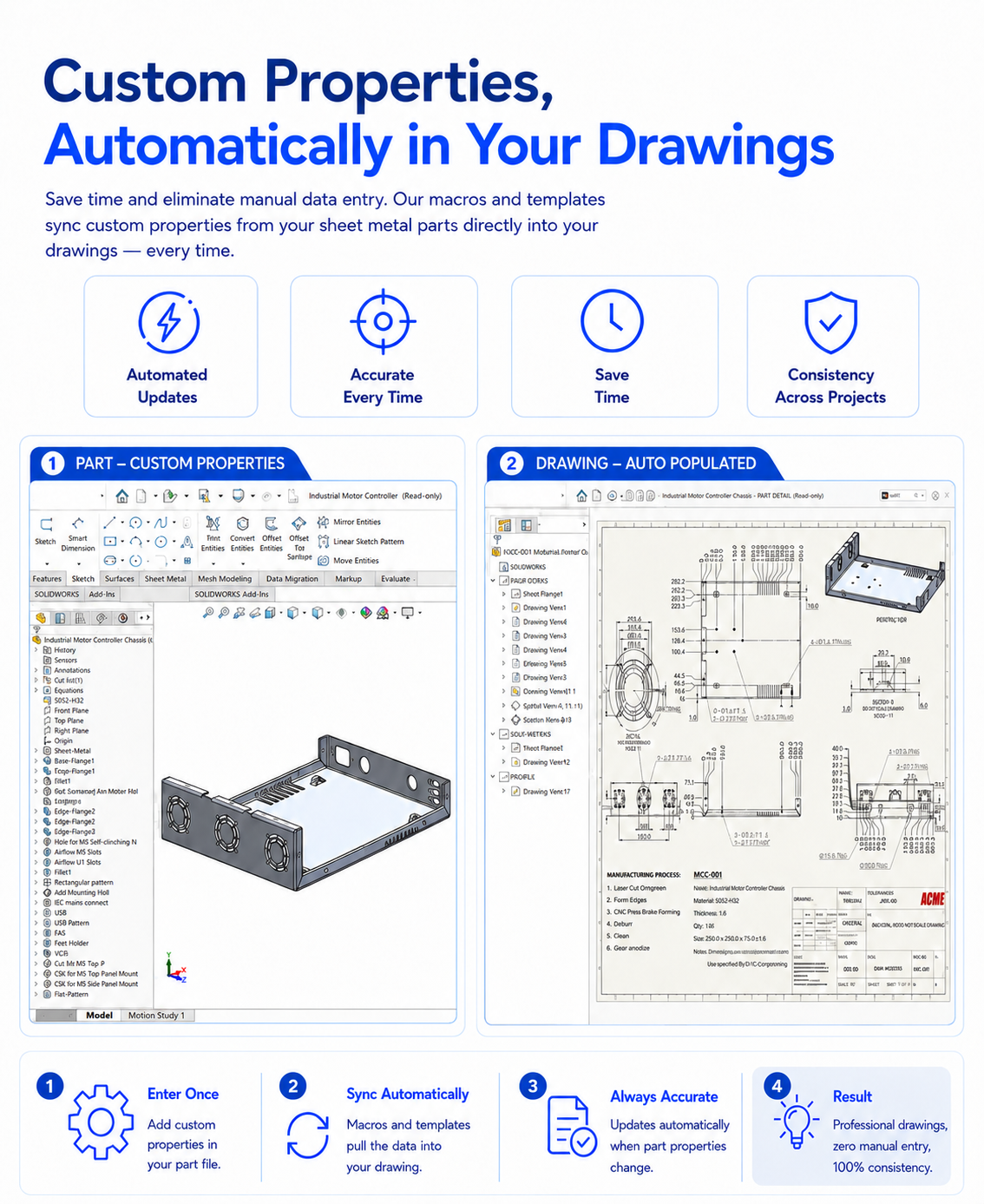 Image 2 of 5
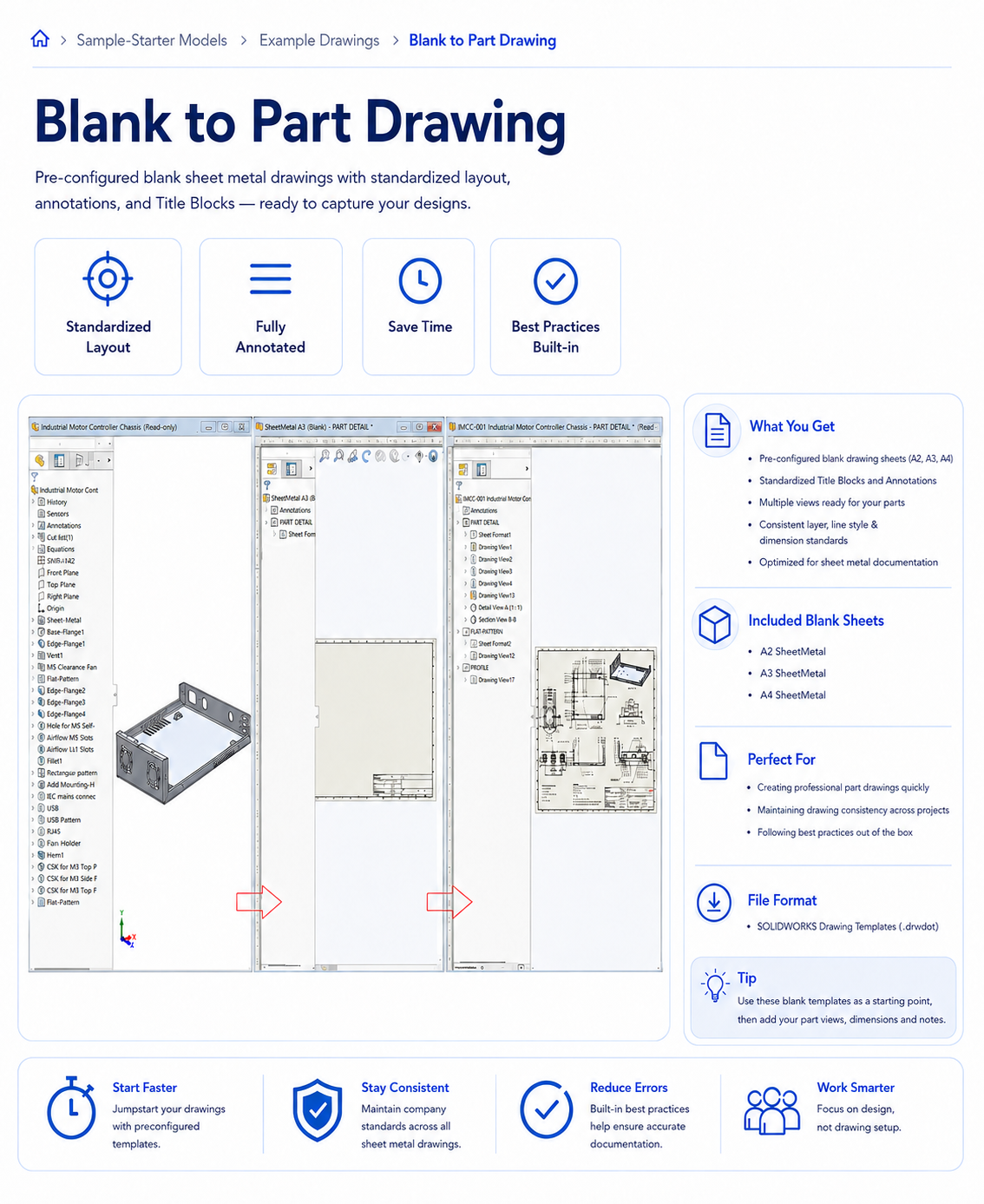 Image 3 of 5
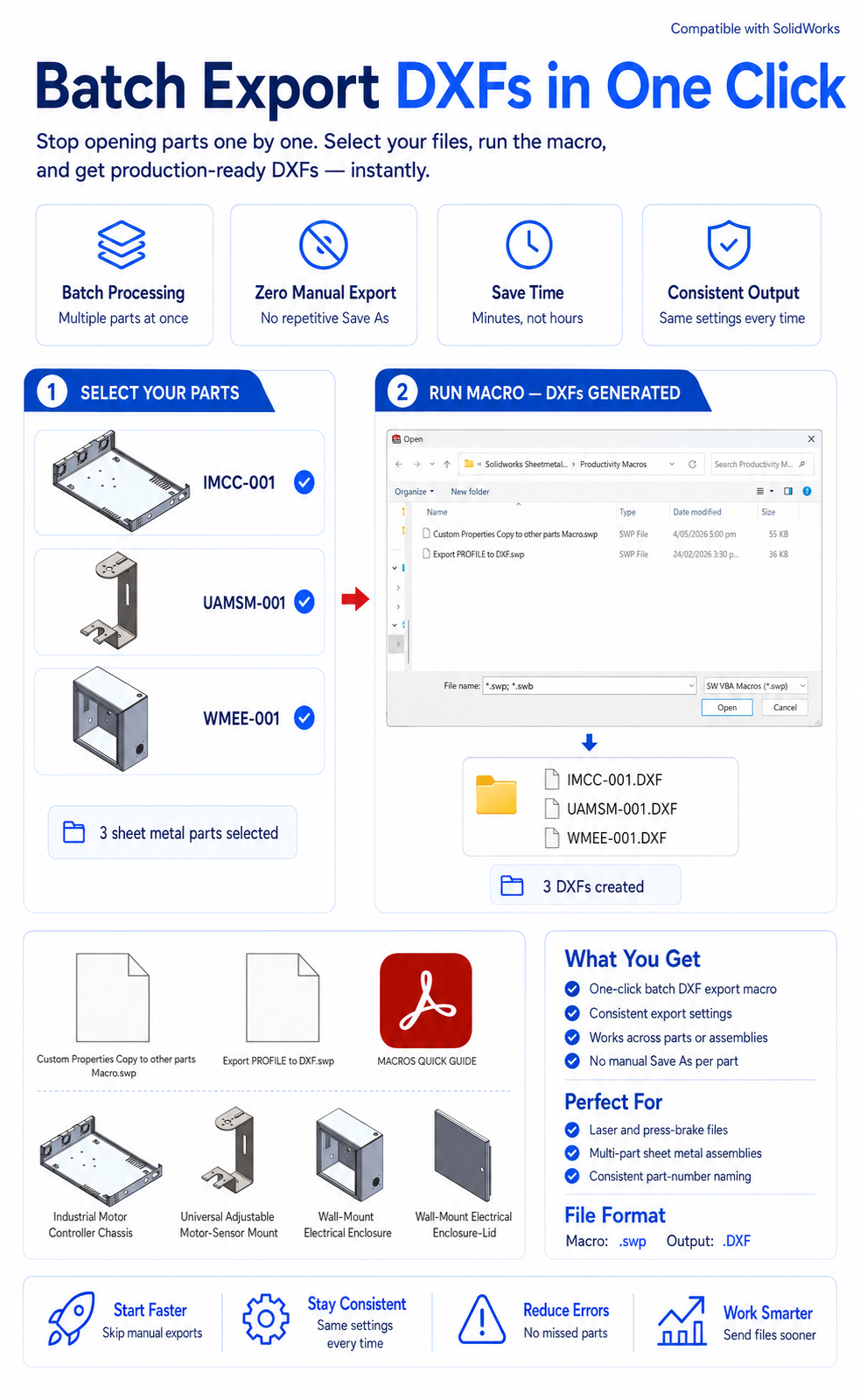 Image 4 of 5
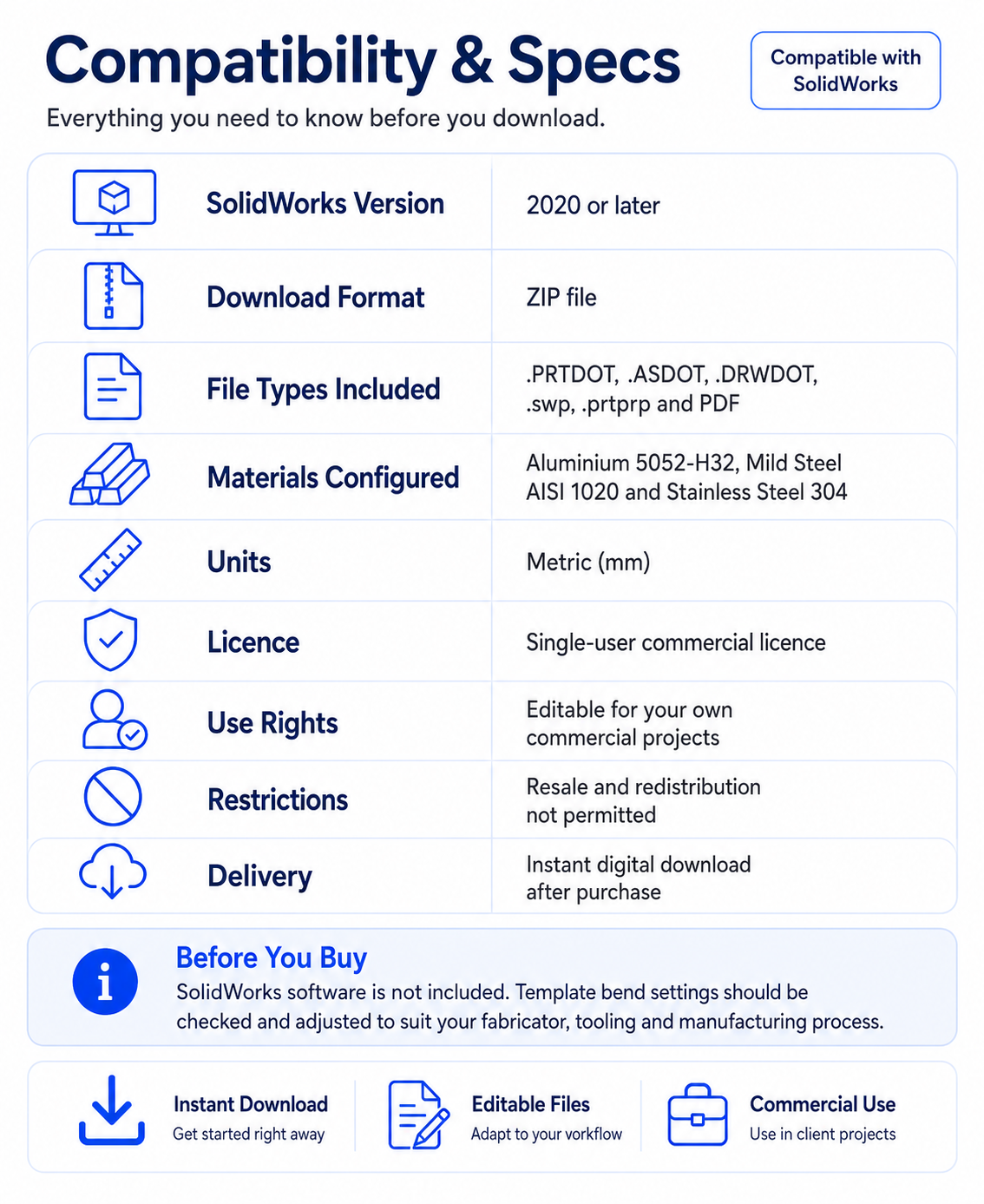 Image 5 of 5
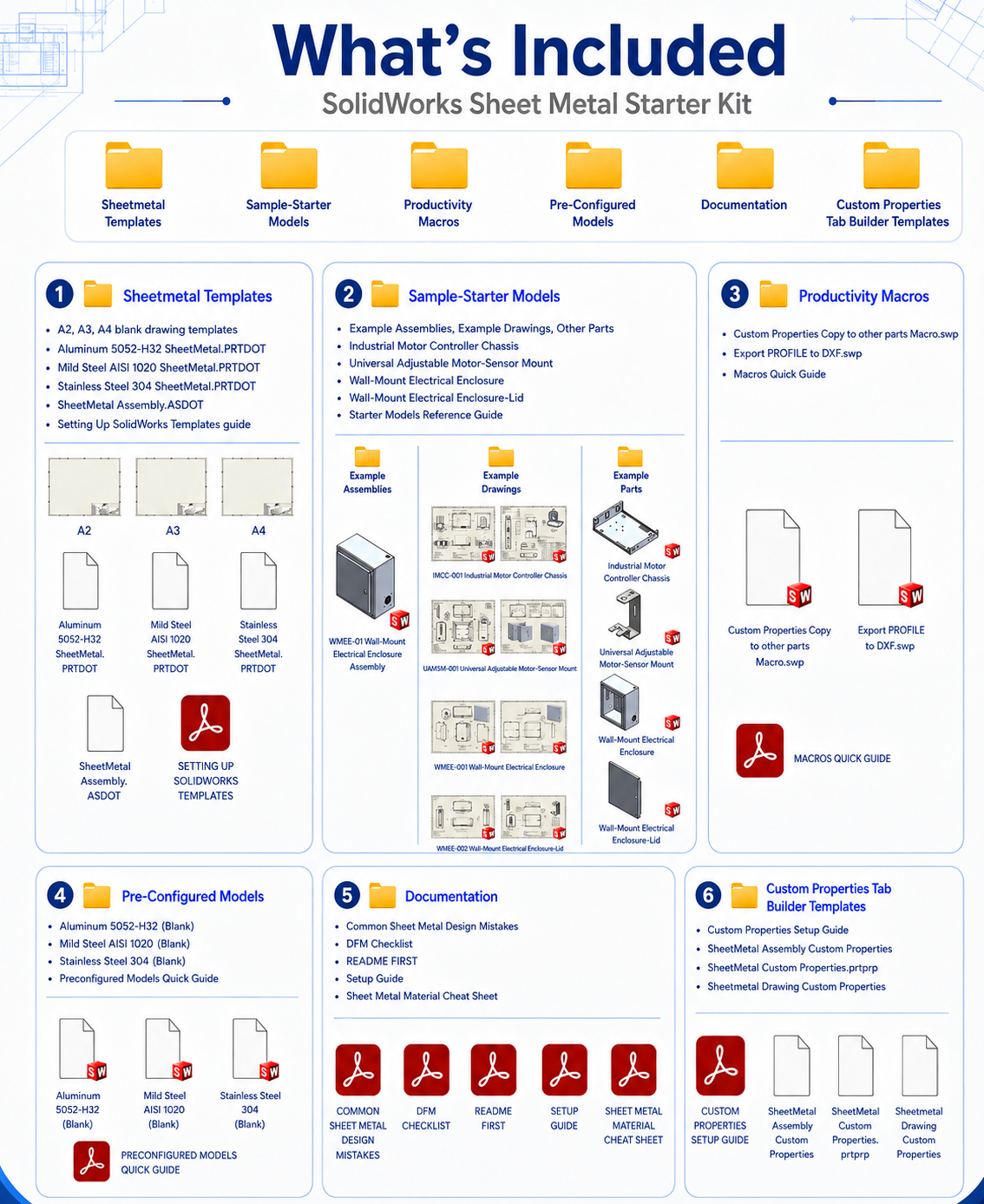
Build accurate, consistent and manufacture-ready sheet metal parts faster with the 3DM Design’s SolidWorks Sheet Metal Starter Kit.
Created by an experienced mechanical design engineer, this downloadable kit provides a practical, organised starting point for professional sheet metal design—without spending hours creating templates, properties, drawings and example files from scratch.
The kit includes preconfigured SolidWorks sheet metal templates with commonly used materials, thicknesses, K-factors and bend radii already set up. Integrated custom properties carry important information such as material, thickness, finish, part number and description through to the supplied drawing templates, reducing repetitive data entry and helping maintain consistency across your projects.
A selection of practical sheet metal sample parts and starter models is also included, giving you useful references for brackets, enclosures, chassis, formed features, flat patterns and multi-part assemblies.
Preconfigured sheet metal templates for commonly used materials and thicknesses
Established K-factor and bend-radius settings
Integrated custom properties for more consistent part and drawing information
Drawing templates that automatically populate information from the model
Practical sheet metal sample parts and starter models
Reference examples for brackets, enclosures, chassis and assemblies
Flat-pattern and manufacturing-drawing examples
Custom Property Tab Builder templates
Productivity macros for faster repetitive tasks
Batch export of multiple drawing and flat-pattern DXF files
Macros for populating and updating custom properties across multiple parts
Fully editable SolidWorks files that can be adapted to your own workflow
Start new sheet metal projects quickly
Maintain consistent material, thickness, bend radius and K-factor settings
Reduce repetitive file setup and manual data entry
Produce cleaner and more reliable flat patterns
Create professional manufacturing drawings
Prepare files for laser cutting, folding and fabrication
Standardise your SolidWorks sheet metal workflow
Build your own reusable design library
The starter kit is ideal for SolidWorks users, product designers, mechanical engineers, fabricators and small manufacturing businesses wanting a faster and more organised sheet metal design process.
All files are supplied in an editable format, allowing you to customise the templates, properties, macros and examples to suit your own materials, machinery, drawing standards and fabrication processes.
Spend less time setting up files—and more time designing products that are ready to manufacture.
Designed in New Zealand for SolidWorks users worldwide.# FAQ
The kit is built for SolidWorks 2020 and later. Files are standard native SolidWorks formats and won't open in earlier versions without conversion.
It's a set of native SolidWorks template, part and drawing files plus VBA macros — nothing to install as an add-in. Just drop the templates into your SolidWorks templates folder and you're ready to go.
Yes. Once purchased, you can use and adapt the templates for your own commercial projects. "Redistribution or resale of the kit itself, in original or modified form, isn't permitted."
The kit ships with commonly used K-factor and bend-radius settings as a starting point. Every fabricator's press brake tooling differs slightly, so you may need to adjust bend allowances to match your supplier's actual bend table — the templates are fully editable so this takes minutes, not hours.
No additional software is required — they run through SolidWorks' built-in macro engine.
"Mild steel, stainless steel (304) and aluminium (5052), in gauges from 1.0mm–5.0mm."
"Yes, minor updates and bug fixes are free for existing customers"
"Because this is a downloadable digital product, we can't offer refunds once the files have been downloaded. If something isn't working as expected, contact us and we'll help sort it out."
No, this kit is built specifically for SolidWorks and relies on SolidWorks-native features (custom properties, Property Tab Builder, VBA macros). It won't import cleanly into other CAD platforms.
"Yes, email contact@3dmdesign.co.nz and we'll help you get set up."
Build accurate, consistent and manufacture-ready sheet metal parts faster with the 3DM Design’s SolidWorks Sheet Metal Starter Kit.
Created by an experienced mechanical design engineer, this downloadable kit provides a practical, organised starting point for professional sheet metal design—without spending hours creating templates, properties, drawings and example files from scratch.
The kit includes preconfigured SolidWorks sheet metal templates with commonly used materials, thicknesses, K-factors and bend radii already set up. Integrated custom properties carry important information such as material, thickness, finish, part number and description through to the supplied drawing templates, reducing repetitive data entry and helping maintain consistency across your projects.
A selection of practical sheet metal sample parts and starter models is also included, giving you useful references for brackets, enclosures, chassis, formed features, flat patterns and multi-part assemblies.
Preconfigured sheet metal templates for commonly used materials and thicknesses
Established K-factor and bend-radius settings
Integrated custom properties for more consistent part and drawing information
Drawing templates that automatically populate information from the model
Practical sheet metal sample parts and starter models
Reference examples for brackets, enclosures, chassis and assemblies
Flat-pattern and manufacturing-drawing examples
Custom Property Tab Builder templates
Productivity macros for faster repetitive tasks
Batch export of multiple drawing and flat-pattern DXF files
Macros for populating and updating custom properties across multiple parts
Fully editable SolidWorks files that can be adapted to your own workflow
Start new sheet metal projects quickly
Maintain consistent material, thickness, bend radius and K-factor settings
Reduce repetitive file setup and manual data entry
Produce cleaner and more reliable flat patterns
Create professional manufacturing drawings
Prepare files for laser cutting, folding and fabrication
Standardise your SolidWorks sheet metal workflow
Build your own reusable design library
The starter kit is ideal for SolidWorks users, product designers, mechanical engineers, fabricators and small manufacturing businesses wanting a faster and more organised sheet metal design process.
All files are supplied in an editable format, allowing you to customise the templates, properties, macros and examples to suit your own materials, machinery, drawing standards and fabrication processes.
Spend less time setting up files—and more time designing products that are ready to manufacture.
Designed in New Zealand for SolidWorks users worldwide.# FAQ
The kit is built for SolidWorks 2020 and later. Files are standard native SolidWorks formats and won't open in earlier versions without conversion.
It's a set of native SolidWorks template, part and drawing files plus VBA macros — nothing to install as an add-in. Just drop the templates into your SolidWorks templates folder and you're ready to go.
Yes. Once purchased, you can use and adapt the templates for your own commercial projects. "Redistribution or resale of the kit itself, in original or modified form, isn't permitted."
The kit ships with commonly used K-factor and bend-radius settings as a starting point. Every fabricator's press brake tooling differs slightly, so you may need to adjust bend allowances to match your supplier's actual bend table — the templates are fully editable so this takes minutes, not hours.
No additional software is required — they run through SolidWorks' built-in macro engine.
"Mild steel, stainless steel (304) and aluminium (5052), in gauges from 1.0mm–5.0mm."
"Yes, minor updates and bug fixes are free for existing customers"
"Because this is a downloadable digital product, we can't offer refunds once the files have been downloaded. If something isn't working as expected, contact us and we'll help sort it out."
No, this kit is built specifically for SolidWorks and relies on SolidWorks-native features (custom properties, Property Tab Builder, VBA macros). It won't import cleanly into other CAD platforms.
"Yes, email contact@3dmdesign.co.nz and we'll help you get set up."